Buncee, the wonderful free (one month trial) tool for creating stunning presentations, project based learning, and more, has just released a new update called Class Organizer, their new polished teacher dashboard. Class Organizer is a super easy to use educational portal that allows educators to seamlessly create and manage student accounts. Teachers will add the student and then create their username and password. You can even batch upload a group of students through a CSV file. All a educator has to do after that is create a class and then drag-n-drop the students to their appropriate class. Also, a teacher can change the student's profile picture, create subgroups, and more.
I highly recommend checking out Buncee by clicking here!!!
Below is a brief demo...
*Buncee is an advertiser of Technology Tidbits.
Tampilkan postingan dengan label project based learning. Tampilkan semua postingan
Tampilkan postingan dengan label project based learning. Tampilkan semua postingan
Rabu, 05 November 2014

Senin, 27 Oktober 2014
Biteslide
 Biteslide is easily one of my favorite Web 2.0 sites for creating dynamic presentations (known as slide books) in a safe environment. Biteslide is a fantastic site for creating presentations that can contain all types of media, such as: video, images, text, links and more. Once a presentation is completed it can then be downloaded, printed out, or best of all embedded into another site/blog. This is an ideal site to engage students, use for any subject, and great for educators as no student email is required (teachers create the student accounts). Also, Biteslide can easily be used to Flip a Classroom or for Project Based Learning!!
I highly recommend checking out Biteslide by clicking here!!!
For my Pinterest board on Web 2.0 in the Classroom click here.
*Biteslide is an advertiser of Technology Tidbits.
Rabu, 22 Oktober 2014
30hands
 30hands is the excellent and free easy to use iOS app that educators are using to integrate technology into their classroom. This is being used in education in many different ways such as "flipping" a lesson, project based learning, and of course, digital storytelling. The drag-n-drop interface makes it seamless to organize slides, and add pictures and video. Best of all a user can record their own narration to tell a story and then upload it to the safe educational 30hands cloud (aka learning community). There is even a inexpensive 30hands Pro app which unlocks all the features in the free app such as: importing video clips, Google Drive/Drop Box integration, and more.
I highly recommend checking out 30hands by clicking here!!!
For more info on 30hands Pro check out Edshelf.
For my Pinterest board on Digital Storytelling click here.
*30hands Learning is an advertiser of Technology Tidbits.
Senin, 20 Oktober 2014
Book Writer One
 Book Writer One is the new free iOS app for digital storytelling brought to you by the company Good Effect (of Book Writer fame). This is an excellent easy to use iOS app that students around the world are using to create beautiful digital stories. Book Writer One has a drag-n-drop interface and allows users to easily create multimedia books by uploading images, audio, video, and more. Best of all, a user can record their own narration to either create a digital story or to "flip" a lesson. Also, educators are using this to create dynamic project based learning assignments.
I highly recommend checking out Book Writer One by clicking here!!!
For my Pinterest board on Digital Storytelling click here.
For more info check out Edshelf.
Kamis, 16 Oktober 2014
Buncee for Edu
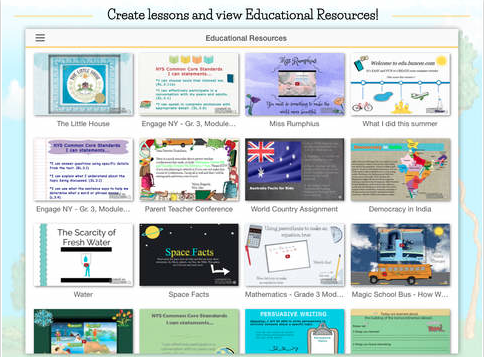 Buncee the very popular web 2.0 tool for creating stunning presentations has just released their long awaited free iPad app. This app w/ educational portal allows educators to seamlessly integrate Project Based Learning, Flip a Class, and much much more. A student can even record their voice for narration or to digitally tell a story, and a educator can use it to "flip" a class or lesson. Best of all, a user/student can share their Buncee publicly or privately in a safe environment. This is a great and easy way to create lessons and assignments and integrate technology into the classroom.
I highly recommend checking out the Buncee for Edu iPad app by clicking here!!!
For my Pinterest board on Project Based Learning click here.
Senin, 29 September 2014
Buncee
What more can be said about Buncee that already hasn't been? Is it easy to use? Yes. Does it have an educational portal so educators can create/manage student accounts? Yes. Does it have lots of teacher examples w/ lessons? Yes, yes, yes!!! Buncee my favorite Web 2.0 tool of 2013 is not only a fantastic tool to use in education (w/ their educational portal), it is a great tool for educators to use to Flip a lesson or classroom. Teachers can create beautiful looking animated and narrated presentations that students can then view at home. Then they can complete their Buncee assignment online and educators can view/grade all w/in the safe web portal.
Also, Buncee is being used in education in many other ways such as:
Also, Buncee is being used in education in many other ways such as:
- posters (more stylized then Glogster)
- eCards
- announcements
- Project Based Learning
- writing prompts
- poetry
- presentations/slides
- and more...
Below is a wonderful Buncee on how it is being integrated into the classroom...
I highly recommend checking out Buncee by clicking here!!!
*Buncee is an advertiser of Technology Tidbits.
Kamis, 25 September 2014
Been for Education

This is ideal for Guided Learning, Flipping a Classroom, Project Based Learning, and can be used by any subject or curriculum. Educators can use it to create internet scavenger hunts, to research/introduce a topic, or any other number of possibilities.
The educator account is perfect for moderating student's Beens (bookmarks/collections), comments, resetting passwords, etc. Being "housed" inside of an educational portal allows for educators to see public Beens but only allows for students to see those of their teacher. Teachers can also collaborate w/ their peers to allow for collective Beens that can be use for group projects.
Finally, the ability to collaboratively surf the web when being on the same page allows for students/educators to share comments and surf together to guide instruction. Also, educators can assess students who have questions when surfing the web or researching a topic.
I highly recommend checking out Been for Education by clicking here!!!
For my Pinterest board on Web 2.0 click here.
Below is a demo video on collaboratively surfing on Been....
4. Surf Together in Class! from Been on Vimeo.
Rabu, 24 September 2014
Shadow Puppet Edu
 I've been in touch w/ the people over at Shadow Puppet and excited to announce their new spinoff free iOS app for education, Shadow Puppet Edu. This is an excellent easy to use app for Project Based Learning and Digital Storytelling. Like the former app it has a drag and drop interface but w/ this new educational instance it allows for easier/safer searching and integration of pictures as well as no student email account to use.
Below is a list of their other features...
- Make videos just like before combining photos, video clips, voice, text and drawing. Use up to 100 images, and make videos up to 30 minutes long. All limits/purchases on the consumer version have been removed and the app will be free for edu use.
- Search the Library of Congress, NASA, Creative Commons, or generic web/gif search for awesome content to include in videos. A citation page is automatically added to the end of the video. We're super excited about the potential here in social science and science classes—our search tools make it possible to access and use amazing content from Library of Congress and NASA in a way we haven't seen any other apps do.
- Common Core-aligned activity ideas to make it easy to get started using Shadow Puppet Edu in English, social studies, science, math, art and foreign language classes.
- Controls to disable web image search. Parental gates for sharing and the ability to disable/enable those as well.
I highly recommend checking out Shadow Puppet Edu by clickinghere!!!
To find Shadow Puppet Edu on Edshelf click here.
For my Pinterest board on Digital Storytelling click here.
Senin, 08 September 2014
Biteslide
 Biteslide is one of my favorite Web 2.0 sites w/ educational portal that is ideal for Project Based Learning. This site allows users to create stunning interactive slideshows or presentations w/ text, audio, images, and more. Also, the educational portal allows for educators to create and manage students accounts, create assignments, and much more in a safe environment. Finally, Biteslide is a very easy to use, can be embedded into a site/blog, or exported into a PDF.
I highly recommend checking out Biteslide by clicking here!!!
For more information check out Edshelf.
For my Pinterest board on Web 2.0 for Schools click here.
*Biteslide is an advertiser of Technology Tidbits.
Senin, 01 September 2014
Book Writer
Book Writer is one of the most beautiful looking iOS apps around for project based learning and digital storytelling. This simple to use drag-n-drop app, allows users to upload photos, add text/images/videos/music, and then record their narration. A finished product can then be exported into iBooks or shared via Dropbox or Google Drive. Finally, educators are even using this to flip a lesson.
I highly recommend checking out Book Writer by clicking here!!!
Below is a brief demo...
I highly recommend checking out Book Writer by clicking here!!!
Below is a brief demo...
Minggu, 31 Agustus 2014
30hands
 30hands is a wonderful free or paid (30hands Pro) iOS app for digital storytelling and project based learning. This is a simple to use yet powerful learning tool that schools everywhere are using to introduce digital storytelling. Through it's drag-n-drop students are uploading photos and then recording their own narration to create wonderful projects/stories and exporting them to Google Drive or the safe and free 30hands "cloud". 30hands Pro unlocks all the features such as uploading video, exporting options, and hi-res video.
I highly recommend checking out 30hands by clicking here!!!
For my Pinterest board on Digital Storytelling click here.
*30hands Learning is an advertiser of Technology Tidbits.
Rabu, 27 Agustus 2014
Zaption
 Zaption is a excellent learning tool that can be used by educators for Blended or Flipped Learning, as well as for Project Based Learning. It allows a user to take a video and edit it by cropping and adding learning elements such as questions to create a "learning tour". Best of all, educators can then track and assess student learning by tracking how they are doing. Also, a "learning tour" can be shared via email or embedded into a site or blog. Finally, a user can browse through any public Zaption and customize it to meet their own needs.
I highly recommend checking out Zaption by clicking here!!!
For my Pinterest board on a Flipped Classroom click here.
Selasa, 26 Agustus 2014
Back to School w/ Tackk
Tackk is a site I've covered before which reminds of a cross between Smore and Pinterest for education. Their educational portal allows educators to create "class" accounts where students can create their own static page and include all types of media (i.e. images, video, text, etc). This summer they've updated their project w/ some niece features for educators to help w/ Back to School such as: collaborating w/ a "stream", promoting school events w/ a widget, more lesson plans and templates, and a contest where students can win up to a $1000 for showing off what they did this summer. Some other ways Tackk is being used is for project based learning, digital portfolios, curating the web, and more.

I highly recommend checking out Tackk by clicking here!!!
I highly recommend checking out Tackk by clicking here!!!
Senin, 25 Agustus 2014
WeLearnedIt
 WeLearnedIt is an excellent free iPad app for the mobile classroom, E-portfolios, and project based learning. This is a state of the art learning system that allows educators to create classes, add students, and then create assignments (containing video, audio, images, etc) and digital portfolios. Also, an educator generate detailed reports, grade/assess students, and interact completely w/ eduClipper. WeLearnedIt is contained in a safe environment and invite students to join classes via a unique code. Best of all, are the abundance of features that a an educator has from setting permissions, to leaving comments, and much much more.
I highly recommend checking out WeLearnedIt by clicking here!!!
For more information check out Edshelf.
Kamis, 21 Agustus 2014
Back to School w/ Buncee
 It's that time of year again when the summer is coming to an end and school is back in session. Lots of times things can be crazy and finding an easy fun activity to do can be a challenge, Buncee is an easy to use site that is ideal for back to school activities and easy to integrate into the classroom. Educators are using this in a ton of ways such as: for writing prompts, back to school night presentations, project based learning, and much much more. Best of all, everything done in a safe secure environment that lets teachers monitor, manage, and create student accounts.
I highly recommend checking out Buncee by clicking here!!!
For more back to school activities click here.
For my Pinterest board on Web 2.0 click here.
*Buncee is an advertiser of Technology Tidbits.
Senin, 28 Juli 2014
Answerables
 Answerables is one of the most unique sites to come around in awhile. It is a cross between a Learning Management System and Game Based Learning environment to deliver a innovative and fun learning experience for students. All of this takes place in a 3D virtual world (i.e. think Second Life but geared towards education) that allows educators to create lessons, scavenger hunts, collaborate w/ other educators, and much much more. Best of all, all of this takes place in Answerables safe interactive environment. Also, Answerables can be used by any curriculum to teach any subject using Project Based Learning, "gamifying"a lesson, and differentiating instruction.
I highly recommend checking out Answerables by clicking here!!!
Below is a brief demo video...
*Answerables is an advertiser of Technology Tidbits.
Kamis, 26 Juni 2014
BoomWriter
 BoomWriter is the free award winning Web 2.0 site for Collaborative Writing. Educators are using this around the world to integrate technology into their classroom in a easy way, as well as using it for Project Based Learning. Best of all, BW is housed in an educational portal that allows educators to create/manage student accounts (no student email is required).
 The innovative process that BoomWriter uses for their collaborative platform allows educators to choose or create their own story starter. Once this is done, each student take part in the writing process and types the next chapter. After that, each student then votes on which chapter they would like included in the finished product, the one w/ the most votes gets included. On and on this process goes until the story or book is finished. All of this is done online and in their safe network and once the finished product is done an actual published book can be order
ed. First time teachers get their very own free class copy.
Also, BoomWriter has lots of educational resources and lessons that other educators can use or look through to see how BoomWriter is being used in other classrooms. Educators are using it for all sorts of Writing projects such as: poetry, persuasive writing, first person stories, and more.
I highly recommend checking out BoomWriter by clicking here!!!
Below is a brief demo...
For my Pinterest board on Web 2.0 click here.
Rabu, 25 Juni 2014
EDpuzzle
 EDpuzzle is vastly becoming one of the premiere web tools around for learning in the classroom. This is fantastic free tool for editing a video, cropping, adding quizzes/polls, narration, etc. then embedding into site/blog. It is being used to flip a classroom or lesson, Project Based Learning, and even for differentiating instruction. The educational portal allows students to sign-up w/out needing an email account and lets educators track student progress in real-time.
I highly recommend checking out EDpuzzle by clicking here!!!
For my Pinterest board on Flipping a Classroom click here.
*EDpuzzle is an advertiser of Technology Tidbits.
Rabu, 28 Mei 2014
Been for Education
 Been for Education is one of my favorite new Web 2.0 sites/companies that is perfect for Social Learning. This is all done through a safe educational portal that allows educators to manage/create student accounts. Been is a great way to collaborative browse the web, curate, and collaborate in a safe environment. It kind of reminds of a cross between Symbaloo and Diigo w/ a more visual and interactive style.
Been is a great tool for Project Based or Guide Learning, and even for Flipping a classroom. The protective "bubble" that Been wraps each web page in is a great way to make browsing the web safe (as well as a district's filter) and interactive for students.
I highly recommend checking out Been for Education by clicking here!!!
For Technology & Learning's review of Been click here.
*Been is an advertiser of Technology Tidbits.
Langganan:
Postingan (Atom)


